- DATE:
- AUTHOR:
- The Distribution Innovation team
New and improved complaint and parcel reports in DI Insight
As part of DI's ongoing efforts to make data and analysis more accessible, we are improving and standardizing our reports. This update introduces one new parcel report and improvements to two existing reports, making parcel data easier to access and use.
Production dates:
New report Parcel Latest Status (ID 643) has been released, October 30th
The reports this will replace will be removed November 12th
One time deliveries Type B and R for distribution date (ID 291)
Parcel Quality (ID 436)
Status delivery receipts(ID 174)
Complaint List for Product Group and Distribution Companies (ID 168) has been released, November 3rd
Changes to Receipt List – Latest Status (ID 317) will be released Thursday November 12th
New report: Parcel Latest Status (ID 643)
We're launching a new report showing all parcels and their latest status and information within a selected date range. Each parcel appears only once, regardless of how many status updates it has received. The report have several options for input, making it suitable for operational use and analytics-export.
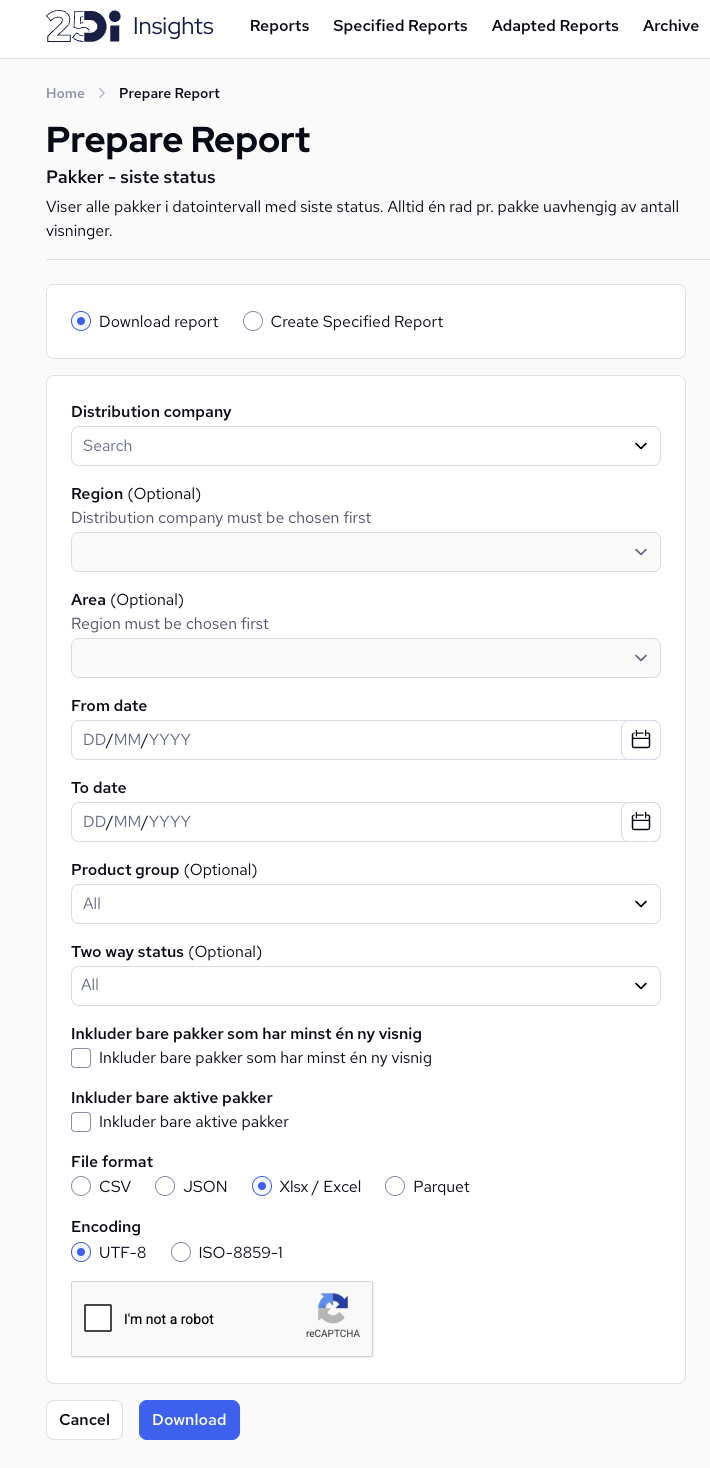
Access: If your user is a distribution manager, region manager, flow admin or have access to DI Control, parcel quality or parcel management you have automatic access to this report, and can see the parcels for your products/geography. If you do not have automatic access contact support with user name and report ID to get access
This report will replace the following existing reports
One time deliveries Type B and R for distribution date, ID 291 (NO: Engangsleveranse type B og R, SE: Utgående och upphämtningspaket för önskat distributionsdatum (Engångsleveranser typ B och R))
Parcel Quality, ID 436 ( NO & SE: Kvalitet på pakker)
Status delivery receipts, ID 174 ( NO & SE: Status leveransekvittering)
Updated report: Complaint List for Product Group and Distribution Companies (ID 168)
NO: Klageliste for produktgruppe og distribusjonsselskap, SE: Reklamationslista per produktgrupp och distributionsbolag
This is a widely used report to track complaints for print and parcels deliveries. We are making changes which makes it easier to combine data from this report with others and standardizing the way data is presented. The following 3 changes will be done:
Added five columns:
RouteId,ProductIdandEscalatedComplaintDistribution,EscalatedComplaintCustomer,EscalatedComplaintDistributionPoint.Standardized the date format in columns J, K and N to
YYYY-MM-DD HH:MM:SS.
Changed the order of the report tabs, so the first tab contain the data and the second tab contain the summary
Updated report: Receipt List – Latest Status (ID 317)
NO & SE: Kvitteringsliste siste status
This is a widely used report, for operational users and analytics. To further improve this we are performing 3 changes:
Added six columns:
RouteId,DeliveryPointId,ProductId,CustomerSysId, FirstDeliveryAttemptandImportedDateThese new columns make it easier to combine data from this report with others. FirstDeliveryAttempt indicate if this is the first delivery or not, and ImportedDate show when the parcel was registered in DI
Updated the "Status"-column (S) to show the original status values without grouping or additional logic.
This will change the output you get in this column. The result of this report will now match the status viewed in other reports and interfaces, and therefor making it easier to see the same data/truth across difference sources. This change does not change the stored data or the actual status of the parcel, only remove grouping logic which was specific for this report.
The key difference is grouping of 4 statuses into "Returned", these 4 statuses will with thus update be displayed separately (Returned, Returned to sender, Delivered by partner carrier and Replaced order)
Added new optional input parameter for "Status". When downloading/exporting the report you can select one or more statuses to filter the output. Making it easier and faster to get the sub-set of data you are looking for.